Friday, 28 November 2008

JDev11g new feature: Effective Dated Entity Objects

Many data models have the concept of effective dates where each row includes effective_from and effective_to dates. For example an employee's wage may very over time, so we store multiple records each with an effective date range with no overlaps in time (unless we want to pay our employees double of course). Within the database we could store this in a separate table to the employees table, tracking the employees changing wages to a specific time period:

CREATE TABLE emp_wages
(wage_id NUMBER(10) PRIMARY KEY
,emp_id NUMBER(10) CONSTRAINT emp_wages_fk REFERENCES employees(emp_id)
,eff_from DATE NOT NULL
,eff_to DATE
,wage NUMBER(10));

INSERT INTO emp_wages
VALUES (1, 1000, '19/OCT/2005','01/MAR/2007', 50000);

INSERT INTO emp_wages
VALUES (2, 1000, '01/MAR/2007','01/JUN/2007', 60000);

INSERT INTO emp_wages
VALUES (3, 1000, '01/JUN/2007', NULL, 70000);


A potential query based on this data is what was the employee's wages 1st April 2007 with the desired result being record 2.

With JDeveloper 10g a potential solution to this using ADF Business Components was to deliver a default EO/VO based on emp_wages, and within the VO add a bind variable and modify the query such that the data could be queried at a certain date.

JDeveloper 11g introduces the concept of Effective Dated Entity Objects which effectively (no pun intended) does this for you based on property settings. You can find documentation on this within the JDev 11g Fusion Guide under section 4.2.8 and section 5.4.

To turn this facility on do the following in your EO:
  • In your EO identify your eff_from attribute. In the Edit Attribute dialog select the Effective Date checkbox followed by the Start radio button.
  • Ditto for the eff_to attribute, except select the End radio button.
  • With the EO document window open, select the General tab, then within the Property Inspector under the Type category, and change the Effective Date Type property = EffectiveDated.
  • Return to the EO document window, under the Attribute tab you'll see a new transient attribute column SysEffectiveDate.
You next need to turn the facility on for the specific VO you want to support this functionality:
  • Open the VO document window.
  • With the General tab selected, in the Property Inspector set the Effective Dated field = True.
  • You'll note within the VO document window Attribute tab, the EO attribute transient attribute SysEffectiveDate.
On running the Business Component Browser and opening the specific VO you'll be prompted to enter a date for SysEffectiveDate. On entering a valid date (eg. 2007-04-01).....


....the records returned in the result set are filtered to this specific date:


If you don't enter a date for the bind variable, the current date is taken as default.

Returning back to the EO Effective Date Type property, you will have noted in the Edit Property dialog you had the option of selecting either EffectiveDated or Dated. The difference in functionality is best explained by the queries ADF BC undertakes on your behalf:

EffectiveDated query:

SELECT emp_wages.wage_id
,emp_wages.emp_id
,emp_wages.eff_from
,emp_wages.eff_to
,emp_wages.wage
FROM emp_wages emp_wages
WHERE (:Bind_SysEffectiveDate
BETWEEN emp_wages.eff_from
AND emp_wages.eff_to)


Dated query:

SELECT emp_wages.wage_id
,emp_wages.emp_id
,emp_wages.eff_from
,emp_wages.eff_to
,emp_wages.wage
FROM emp_wages emp_wages
WHERE (:Bind_SysEffectiveDate
BETWEEN emp_wages.eff_from
AND COALESCE(emp_wages.eff_to, TO_DATE('12/31/4712', 'MM/DD/RRRR')))

Monday, 17 November 2008

Creating JAX-WS web services via a WSDL in JDev 11g

I'm currently working with JDeveloper 11g's facilities for generating JAX-WS Java web services from a defined WSDL file. The following encompasses my notes on getting this running which may be useful to readers. Your mileage may vary.

Goal

Define a single web service operation using JAX-WS, to lodge a data payload with 2 fields and return a data payload of 3 fields. The incoming and outgoing payloads will be based on an XML Schema document. The web service operation JAX-WS Java code will be defined via first defining the WSDL in JDeveloper, then generating the JAX-WS wrappers based on the WSDL.

Steps

The steps we'll undertake in achieving our goal:

1) Setup an Application Workspace and Project
2) Create the XML Schema for the Web Service
3) Create the WSDL file for our Web Service
4) Generate the JAX-WS classes for our Web Service
5) Deploying our Web Service to WLS

Setup an Application Workspace and Project

We first need a JDeveloper Application Workspace and Project to store our work.

Via the New Gallery create a new Application Workspace based on the Generic Application template.
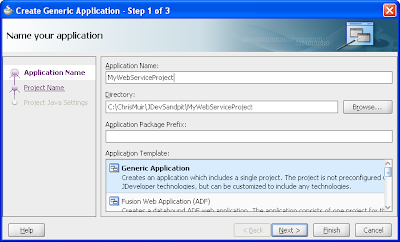

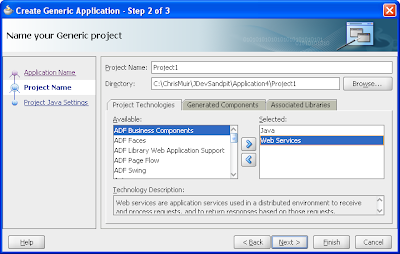
Ensure within step 2 of 2 for the Application Workspace, for the single project the template creates, that you include Web Services as part of the Project Technologies:

Create the XML Schema for the Web Service

Our web service will be "document" based, passing XML payloads back and forwards based on an XML Schema. We need to define the XML Schema and its individual elements for both

In the new project create a XML Schema via the New Gallery -> All Technologies -> General -> XML -> XML Schema option.
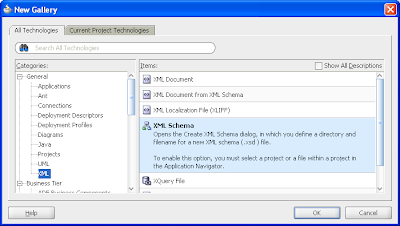

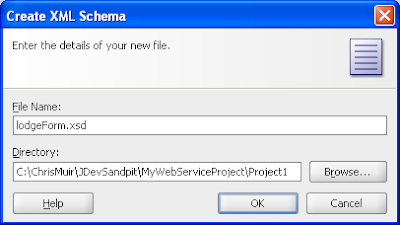
Give the XML Schema a name and change the default directory to:

&<app root>/<project name>/public_html/WEB-INF

Modify the XML Schema using JDeveloper's XML Schema design facilities:
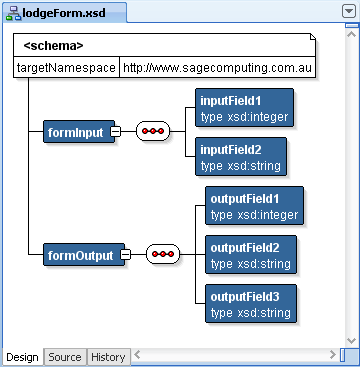

Or edit the XML code directly:

<?xml version="1.0" encoding="windows-1252" ?>
<xsd:schema xmlns:xsd="http://www.w3.org/2001/XMLSchema"
  targetNamespace="http://www.sagecomputing.com.au"
  elementFormDefault="qualified">
  <xsd:element name="formInput">
    <xsd:complexType>
      <xsd:sequence>
        <xsd:element name="inputField1" type="xsd:integer"/>
      <xsd:element name="inputField2" type="xsd:string"/>
      </xsd:sequence>
    </xsd:complexType>
  </xsd:element>
  <xsd:element name="formOutput">
    <xsd:complexType>
      <xsd:sequence>
        <xsd:element name="outputField1" type="xsd:integer"/>
        <xsd:element name="outputField2" type="xsd:string"/>
        <xsd:element name="outputField3" type="xsd:string"/>
      </xsd:sequence>
    </xsd:complexType>
  </xsd:element>
</xsd:schema>


Create the WSDL file for our web service

The WSDL file will define the structure of our web service operation, including data payloads, for consumers of our web service to understand our web service spec, as well as allow JDeveloper to generate the JAX-WS Java code implementing our web service operation.

In our project select the New Gallery -> Current Project Technologies -> Business Tier -> Web Services -> WSDL Document:
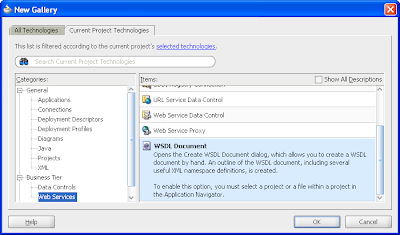

Give the WSDL file a name, leave the other fields the default values:
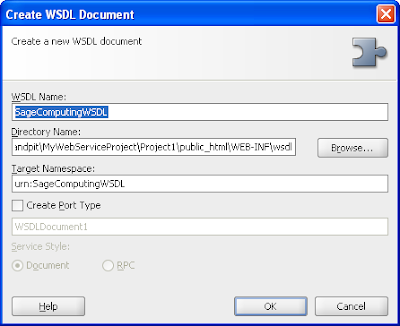

JDeveloper provides a graphical design tool where you can define the parts of the WSDL file, by dragging in components from the Component Palette, or using the available Add and Delete buttons to define each part:
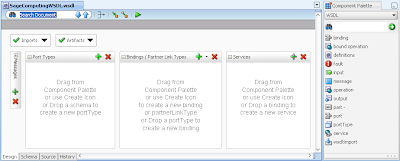

First thing we wish to define with the WSDL file is code to import our XML Schema from the previous step. This is easiest done by inserting the following code into your WSDL file directly between the <definitions> tags, as well as adding the XML Schema as an xmlns attribute of the overall definitions:

<?xml version="1.0" encoding="UTF-8" ?>
<definitions targetNamespace="urn:SageComputingWSDL"
  xmlns="http://schemas.xmlsoap.org/wsdl/"
  xmlns:tns="urn:SageComputingWSDL"
  xmlns:xsd="http://www.w3.org/2001/XMLSchema"
  xmlns:soap="http://schemas.xmlsoap.org/wsdl/soap/"
  xmlns:mime="http://schemas.xmlsoap.org/wsdl/mime/"
  xmlns:soap12="http://schemas.xmlsoap.org/wsdl/soap12/"
  xmlns:sage="http://www.sagecomputing.com.au">
  <types>
    <xsd:schema targetNamespace="http://www.sagecomputing.com.au">
      <xsd:import namespace="http://www.sagecomputing.com.au" schemaLocation="../../lodgeForm.xsd"/>
    </xsd:schema>
  </types>
</definitions>


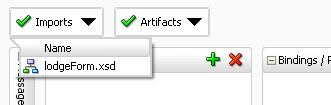
On returning to the WSDL designer, the Import dropdown will now include the XML Schema as an import.

Next we need to define the message payloads for the web service operation, namely both an input and output based on the XML Schema we just imported.

Expanding the Messages option within the WSDL designer and selecting the Add button, we add two messages, ie. FormInput and FormOutput.

For the FormInput, we right click on the object, select Insert inside FormInput -> part. This displays the Create Part dialog where we give the part a name of FormInput, a Reference Type of Element, and select the sage:FormInput element.
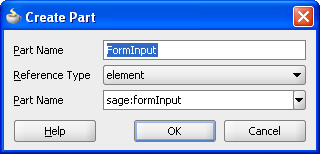

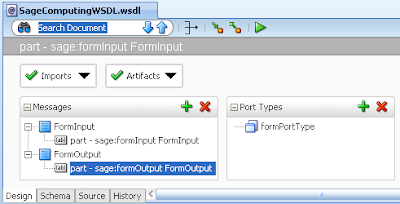
We repeat this for the FormOuput, giving the part a name of FormOutput, a Reference Type of Element and select the sage:FormOutput element. The resulting WSDL design for the messages will look like:

Next we define our Port Type supporting our web service operation. By clicking the Plus button on the Port Type option you can name the new port type, for instance: formPortType.

Next right click on the new Port Type, then the Insert inside formPortType option, followed by the Operation selection. This invokes the Create Operation dialog:
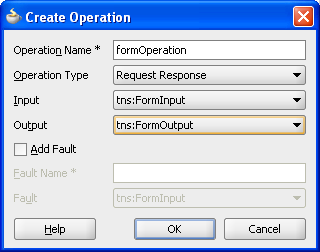

Here we define the operation name, that our operation will accept and return a payload (ie. Operation Type = Request Response), and select the Input and Output message types we defined in the earlier step.

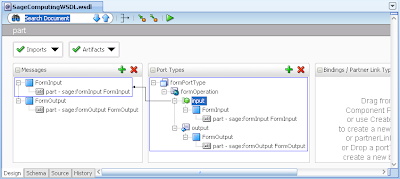
On returning to the WSDL designer, selecting different parts of the messages and port types shows you diagrammatically the dependencies:

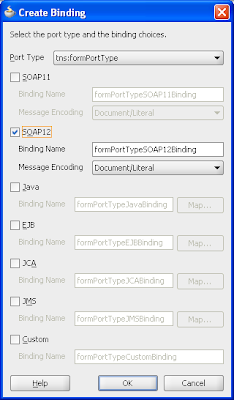
Next by clicking on the Add button in the Bindings we invoke the Create Binding dialog. This allows us to define the Binding is for the Port Type we just created, which version of SOAP we'll use as well as the binding name and message encoding style.

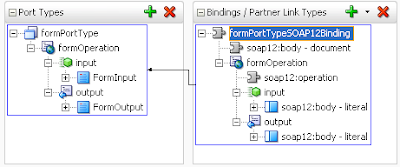
On returning to the WSDL designer we can now diagrammatically see the dependencies between the Bindings and the Port Types.

Finally in the WSDL designer we create the Service via the Add button on the Services component. Simply we give the Service a name such as SubmitForm.

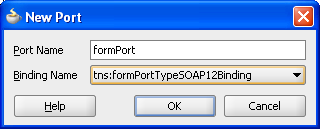
We then right click on the Service name, select the Insert into SubmitForm option then the port option. This allows us to define the Port name and the Binding that it maps too we created earlier:

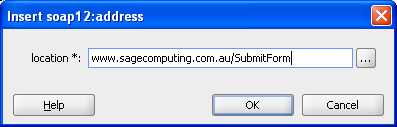
Within the Port we must add the URL address of the Port which encompasses the server we'll deploy the web service too, so we right click and select the Insert into soap12:address:

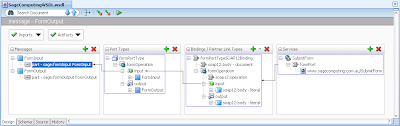
The complete WSDL diagram looks as follows:

Generate the JAX-WS classes for our Web Service

Once we've created our WSDL file, JDeveloper provides a generator that will create JAX-WS based Java code based on what defined in the WSDL file, saving us having to code the Java code by hand.

Invoke the New Gallery -> Current Project Technologies -> Business Tier -> Web Services -> Java Web Services from WSDL option:

In the associated wizard skip Step 1 of 7. For Step 2 of 7 select the "Java EE 1.5, with support for JAX-WS Annotations" option.

In Step 3 of 7 select your WSDL file in the drop down, leave the default values.

In Step 4 of 7:
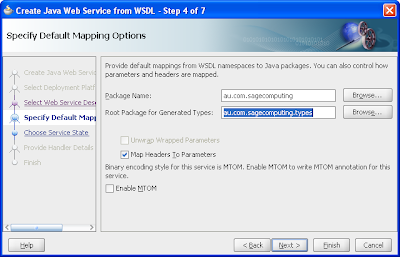

The Package Name is the Java package where your JAX-WS classes will go. The Root Package for Generated Types it the Java package that will encompass JAXB Java classes that model your XML Schema elements, used by the JAX-WS web service code. Leave the other default values.

Click the wizard finish button.

The generator will create a number of files with the resulting structure in the Application Navigator:
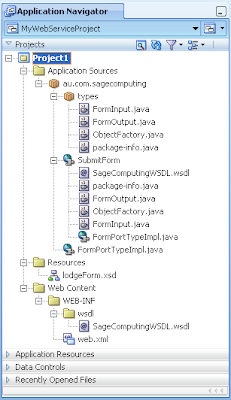

The most interesting of these to look at is the FormPortTypeImpl.java that implements the web services using JAX-WS:

package au.com.sagecomputing;

import au.com.sagecomputing.types.FormInput;
import au.com.sagecomputing.types.FormOutput;
import au.com.sagecomputing.types.ObjectFactory;

import javax.jws.WebMethod;
import javax.jws.WebParam;
import javax.jws.WebResult;
import javax.jws.WebService;

import javax.xml.bind.annotation.XmlSeeAlso;
import javax.xml.ws.Action;
import javax.xml.ws.BindingType;
import javax.xml.ws.soap.SOAPBinding;

@WebService(name = "formPortType", targetNamespace = "urn:SageComputingWSDL", serviceName = "SubmitForm", portName = "formPort", wsdlLocation = "/WEB-INF/wsdl/SageComputingWSDL.wsdl")
@XmlSeeAlso( { ObjectFactory.class })
@javax.jws.soap.SOAPBinding(style = javax.jws.soap.SOAPBinding.Style.DOCUMENT, parameterStyle = javax.jws.soap.SOAPBinding.ParameterStyle.BARE)
@BindingType(SOAPBinding.SOAP12HTTP_BINDING)
public class FormPortTypeImpl {
    public FormPortTypeImpl() {
  }

    @javax.jws.soap.SOAPBinding(parameterStyle = javax.jws.soap.SOAPBinding.ParameterStyle.BARE)
    @Action(input = "urn:SageComputingWSDL/formOperation", output = "urn:SageComputingWSDL/formPortType/formOperationResponse")
    @WebMethod(action = "urn:SageComputingWSDL/formOperation")
    @WebResult(name = "formOutput", targetNamespace = "http://www.sagecomputing.com.au", partName = "FormOutput")
    public FormOutput formOperation(@WebParam(name = "formInput", partName = "FormInput", targetNamespace = "http://www.sagecomputing.com.au")
        FormInput FormInput) {
        return null;
    }
}


Note that the Java method formOperation accepts our FormInput datatype and returns the FormOutput type. Both of these classes have been generated as classes in their own right which we can now use as fully fledged Java classes. As such we can modify our formOperation method as follows:

public FormOutput formOperation(@WebParam(name = "formInput", partName = "FormInput", targetNamespace = "http://www.sagecomputing.com.au")
    FormInput FormInput) {
  FormOutput fo = new FormOutput();
  fo.setOutputField1(FormInput.getInputField1().add(new BigInteger("5")));
  fo.setOutputField2(FormInput.getInputField2().concat(": Welcome!"));
  fo.setOutputField3("This is your reply");
  return fo;
}


Running our Web Service to WLS

Assuming you've already set up a connection to your favourite WebLogic Server and pre-configured WLS domain in JDeveloper, to deploy our application from JDeveloper is simply a case of right clicking the project, then Deploy -> WebServices -> to -> (your server connection name).

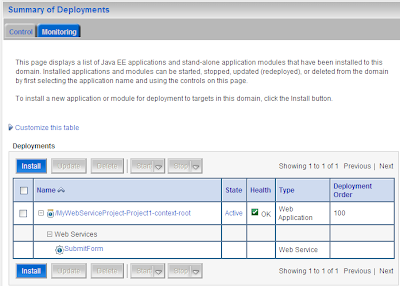
Once the application is deployed to WLS, logging into the WLS server console, clicking on the Deployments node, you'll see your application within WLS, which you can then expand to see your actual web service:

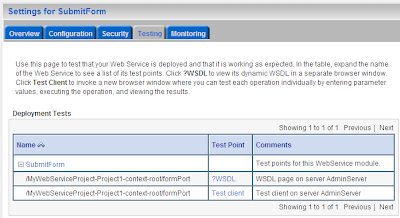
Selecting the web service, then the testing tab reveals both the URL of the WSDL file and the ability to invoke the Test Client:

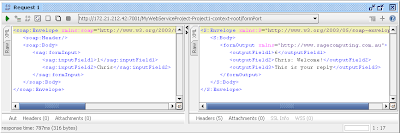
I'm currently unable to get the Test Client working, so instead I used SoapUI to create a new project plugging in the WSDL, selecting my web service, entering values for the generated XML payload with the following result:
Monday, 10 November 2008

JDeveloper 11g certification matrices

I stumbled across (what I think is) some new(ish) documentation for JDeveloper 11g today under the Install Notes parent page, which I thought might be useful to some readers.

From the Install Notes page you can access documentation on JDeveloper 11g certified platforms, deprecated features and third party software libraries:

Tuesday, 28 October 2008

ESB vs OESB vs ALSB vs OSB vs, um....

Given Oracle's BEA acquisition earlier this year, and various announcements by Oracle around the middleware stack including their 2008 July 1st announcements and various reinforcements at OOW08, there's a lot to learn and keep track of.

(And I thought Christmas was to be a quiet period this year)

I'm currently investigating Oracle's movements in the Oracle Enterprise Service Bus arena, and following my research I thought I'd share my findings for others to use. I'm sure to anyone in the ESB and SOA arenas this is all immediately obvious, but to an outsider looking in there's a lot of information to digest.

Warning: you're mileage may vary on the following information. I'm not an ESB or SOA expert in anyway, thus my research. Please take time to confirm these facts. I'd appreciate if you find
a glaring hole in my understanding that you post a comment so other readers aren't mislead.

ESB/OESB

  • Oracle's traditional Enterprise Service Bus is known as ESB or OESB. On the internet the concept of an Enterprise Service Bus is a rather generic and loosely used term. For Oracle's offerings I'll refer to it as ESB or classic ESB here on.

  • I haven't been able to determine if it was possible to buy ESB by itself, or it only came as part of the SOA 10g suite; it would seem conceivable to me you might want ESB without the SOA wrappings. ESB is not currently listed on the Oracle Australia Shop

  • Checking Oracle's website 23/Oct/08, the Oracle site at times referred to ESB as OSB, a confusion with the future OSB->ALSB platform name (see below). I assume this was a transitional marketing misnomer and to be ignored. However as of 27/Oct/08 given the OSB->ALSB 100-day-release (again see below), the ESB website link has gone, for reference existed here and the Google cached page here,

  • From a conversation with another Oracle ACE Director, my understanding is the classic ESB was not heavily used by the SOA 10g Suite; BPEL could exist mostly without. I guess this implies classic ESB was more of an option in the 10g release which you could make use of.

  • The primary interface for working and configuring ESB is JDeveloper 10g.

  • Within the future FMW 11g platform as part of SOA, classic ESB is mostly removed with a part remaining known as "Mediator", purely remaining for the SOA suite. Mediator within SOA ties existing EDN (Event Delivery Network) and SCA services together.

  • Speculation: it seems odd that Oracle has kept a part of ESB for their future platform, given the adoption of OSB/ALSB (see below). Maybe Oracle considered dropping ESB completely for the upcoming FMW 11g release, but Oracle decided this target was too ambitious for the 2009 deadline? The logical conclusion is ESB will be totally dropped in the future, possibly by FMW 11gR2?

ALSB vs OSB

  • Upon Oracle's acquisition of BEA they obtained BEA's SOA suite known as Aqualogic. Aqualogic like Oracle's own SOA suite included an Enterprise Service Bus platform known as Aqualogic Service Bus. An internet search reveals the commonly used acronym ALSB.

  • ALSB has been re-badged by Oracle as Oracle Service Bus (OSB), and should not be confused with the classic ESB/OESB offerings from Oracle.

  • The latest version of ALSB v3.0 was certified against BEA WebLogic Server v10, not 10.3 (source - see pre BEA acquisitions section).

  • A significant difference for Oracle customers between classic ESB and ALSB is the missing JCA Adapters. Classic ESB included a range of adapters for connecting ESB to different sources and destinations, the most important being for Oracle customers the Oracle database.
OSB
  • OSB will mostly replace classic ESB in FMW 11g and the SOA Suite, except for the classic ESB "Mediator" component.

  • OSB is considered to be a more sophisticated product than classic ESB. The recently published OSB statement of direction from Oracle infers that they were written for different markets, but given that ESB has nearly been removed this would imply that classic ESB is inferior.

  • The current OSB release as of 27/Oct/2008 as blogged by Chuck Speaks most importantly includes a framework for JCA Adapters which was missing from the original ALSB platform (see the ALSB vs OSB section above that discusses the JCA Adapters for more information). Note it's a "framework" allowing for JCA Adapters, not the actual adapters themselves. I've been told that Oracle plans to release a range of JCA Adapters in January 2009 including those for the Oracle database. I'm unsure if that is a "hard-date" from Oracle or an unconfirmed fact; be careful to base any future OSB adoption plans on the date published in this blog. This conclusion seems to be supported by this OTN forum post.

  • Somebody mentioned to me OSB (and ALSB) support raw JDBC calls to a database, though I believe read-only at this time, and I haven't found a reference to this in the documentation. Otherwise I also believe its supports EJB v2.1; of not significant benefit because of the complexity of anything EJB prior to v3.

  • The OSB release is certified against WLS 10.3 as per the following OTN post (thanks to Eddie and Mark for their assistance on confirming that fact).

  • Currently OSB allows the user to configure it via the WLS console or an Eclipse add-on. Future support will be added to JDeveloper, conceivably for the FMW 11g Bulldog release in 2009.

  • At the time of writing, the licensing options for OSB via Oracle Shop Australia are AU$24, Processor Perpetual, or AU$480.00 Named User Plus Perpetual.
Sources of information and references

AMIS: http://technology.amis.nl/blog/3566/the-amis-team-reports-from-oracle-open-world-big-and-small-announcements-guidance-and-tips#more-3566 (see slide 19)

Oracle OSB website: http://www.oracle.com/technology/products/integration/service-bus/index.html

Oracle OSB statement of direction (SOD): http://www.oracle.com/technology/products/integration/service-bus/docs/Oracle-Service-Bus-SOD.pdf

Note the SOD mentions migration paths for existing ESB and ALSB customers that may be of interest to some readers.

Thanks to....

My thanks for assistance with the above summary to Lucas Jellema and Peter Ebell from AMIS, and Eddie Ho at Oracle Australia. Please note any facts above that are wrong or misleading are 99% probable my fault and in should in no way be attributed to these folks.

Sunday, 26 October 2008

Down-under events: Lucas Jellema on SOA and SQL Puzzles

I note Lucas Jellema will be down-under early in 2009 to present SOA for Database Professionals and Oracle SQL Inside Out - Challenging Puzzles and Puzzling Challenges under the Oracle University Seminar series. It's great Lucas is heading down our way (though not Perth I see!... we miss out again!!!!) and I highly recommend if you can check out Lucas's presentations. Lucas is a very knowledgeable and enthusiastic Fusion Middleware Oracle ACE Director, well worth a few training dollars to see.